AI Chat
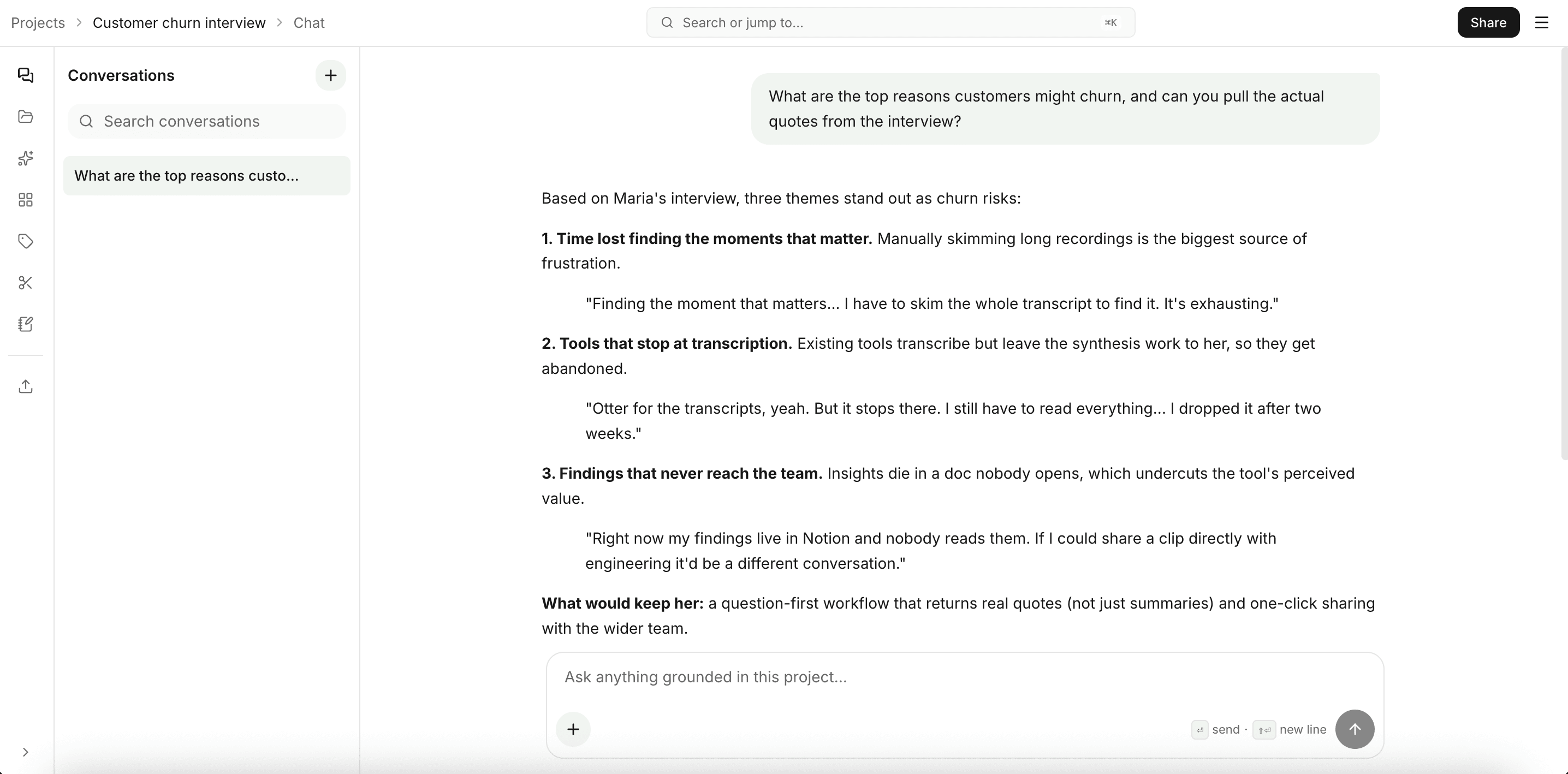
Chat is the front door of every project. You ask, the agent works.
The agent reads your files, runs comparisons, builds artifacts, and cites every claim. Behind the scenes it has fifteen tools: searching transcripts, listing assets, finding tagged quotes, drafting reports and decks, building bar / pie / flow charts, creating clips, adding to collections, applying tags. You don't see the tool names; you ask in plain language.
What you can ask
A few patterns that work well:
- "What are the three most-mentioned pain points across all interviews?"
- "Build a flow of the user's task journey."
- "Pie chart of sentiment across sessions."
- "Compare feedback between power users and newcomers."
- "Pull the strongest quotes about pricing into a clip each."
- "Draft a 5-slide deck summarizing churn drivers."
The chat composer has a starter library (Discover, Summarize, Compare, Visualize) plus quick chips you can click instead of typing.
What comes back
The agent answers in the chat thread and, where it makes sense, also creates artifacts that show up in Outputs:
- Charts render inline in the response and as standalone artifacts you can open later.
- Clips show up in Clips and Outputs.
- Reports and decks open in their own editors from Outputs.
- Tags applied by the agent show up in Tags.
Every claim the agent makes ties back to a specific file and timestamp. Click a citation to jump to the source.
Live agent timeline
While the agent works, the chat shows a timeline of what it's doing: which file it's reading, which tool it's running, what it's planning next. The trace persists across page reloads so you don't lose track if you switch tabs mid-turn.
Project chat vs. the global assistant
This page covers the chat inside a project, scoped to that one project's files. There's also a global assistant in the top-level Chat tab that works across all your projects at once and can search the web and academic papers. Reach for the project chat when you're focused on a single study; reach for the global assistant when you're working across projects or need outside sources.
Free-plan limit
Free projects allow ten messages before you'll need to upgrade. Paid plans have no chat limit.
Tips
- Be specific about scope. "What did participants in interview 3 say about onboarding?" beats "tell me about onboarding."
- Ask for structure when you want it. Tables and bullet lists come out cleaner when you ask for them by name.
- Iterate. Follow-ups stay in context. Push back if an answer feels too general.
- Use chat to draft outputs, not only answer questions. Ask for a chart, a report, or a deck and the right tool runs; the artifact lands in Outputs.
If a response looks wrong, click the citation to verify the source. That's the fastest way to spot a model miss versus a data gap.